


Ocean Fishooter-fishing king 3
4.7516.00 Reviews
App Specs
- Version
- 1.4.1
- Updated On
- License
- Free
- Downloads
- 100,000+
- Developer
- FALA PTE. LTD.
- Categories
- Casual
- Platform
- Android
Screenshots







 Analysis by AppCompare
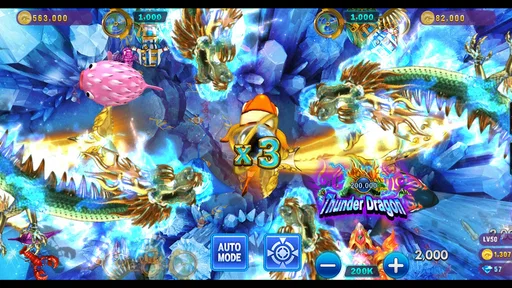
I picked up Ocean Fishooter-fishing king 3 expecting a quick casual game, and that is exactly where it makes the most sense. It turns fishing into a shooting-based arcade activity: you aim at sea creatures, fire, and try to turn short bursts of attention into satisfying wins. The idea is easy to understand within moments, which makes it a natural candidate for a shared phone or tablet in a household where different people want something light rather than a long, demanding game.
My overall impression is positive, but specific. This is not a quiet fishing simulator, a story-driven adventure, or a deep competitive game. It is a bright, immediate casual arcade game built around repeated aiming and reward. I enjoyed it most when I had a few spare minutes and wanted something more interactive than scrolling. The free entry point helps, although the range of optional purchases means I would treat it as a game to sample carefully rather than something to hand over without any conversation about spending.
How Ocean Fishooter fits into a shared household
The strongest household use case is a common device that moves between people during small gaps in the day. One person can play while waiting for dinner, another can take a turn later, and nobody needs to learn a complicated control scheme before getting started. Because the central action is so direct, a younger player and an adult can understand the basic loop without a tutorial session becoming a family project.
That simplicity also creates a useful boundary: the game works well as a short-turn activity, but it does not automatically create a shared multiplayer experience. I would not install it expecting everyone in the room to coordinate inside the same match. Instead, I would treat it like a pass-and-play entertainment option, with each person deciding when to use the device and when to leave it available.
In a realistic evening scenario, I could see one family member playing for a few minutes after work, putting the phone down, and another person trying it later without needing a full explanation. The handoff is easy because the visible goal is obvious: aim at the fish and shoot. The less obvious part is agreeing on whose progress or resources are being used, especially if several people share one device or one game profile.
That is where the game differs from a board game or a deliberately cooperative family title. A board game gives everyone a clear turn structure, while this experience leaves the household to organize itself. If you want conversation, planning, and joint decisions, a puzzle or local multiplayer game may be a better choice. If you want something that can be picked up and put down without ceremony, this one has a clear advantage.
What to decide before handing over the device
I recommend agreeing on a simple routine before several people start using it. Decide whether the device belongs to one player or whether everyone is merely taking turns. That distinction matters because a shared session can blur who earned progress, who spent a resource, and who was simply trying the controls. Even without inventing extra rules, a household can avoid confusion by treating each turn as a short visit rather than assuming the game will manage family roles.
Worth Reading Before You Choose

EA SPORTS FC Mobile 26 Is a Bigger Football Game, but It Takes Time

Flipboard Shows What News Apps Must Do Beyond the Feed

Switching to Android Auto Means Rethinking Your Driving Routine

Google Calendar Makes a Crowded Week Easier to Manage

Ludo King Makes the Most of the Minutes Between Plans

Baby Panda World Brings Quick Play to Modern Phones, but Its Game Library Feels Busy
I would also keep purchases out of the casual handoff. The game is free to download and play, but optional items range from $0.99 to $204.99 each. That is a very wide range, and it changes the practical advice for shared use. Before letting a child or guest explore freely, the account holder should check the device’s purchase protections and make sure everyone understands that tapping a tempting offer may have real consequences.
This is not a criticism of the basic fishing-shooting concept; it is a reminder that the smoothest part of the experience is also the part that encourages quick decisions. A child who understands “tap to shoot” may not understand the difference between ordinary play and a purchase prompt. Adults sharing the device should handle that boundary themselves instead of expecting the game to explain household rules.
Setup, account boundaries, and practical handoffs
The technical entry point is friendly for older devices because the game supports Android 5.0 and later. That makes it more approachable for households that keep an older spare phone or tablet around. Still, compatibility alone does not settle whether a device is suitable for sharing. Screen size, battery condition, storage space, and the comfort of the controls will affect whether the game feels pleasant during repeated handoffs.
I would set it up on the device that is actually available for casual play, rather than installing it everywhere immediately. A single shared device makes it easier to see who is using it and reduces the chance of different people making separate assumptions about progress or spending. On the other hand, if two people want independent experiences, separate devices are cleaner than trying to make one profile represent an entire household.
The developer is FALA PTE. LTD., and the current version is 1.4.1. Those details are useful when checking that the correct listing and installed build are being used, particularly if a household has more than one device. I would also check the game after an update before a child uses it independently, not because an update is automatically a problem, but because interface placement and prompts can change in any app or game.
One practical habit is to keep the device in a neutral place between sessions. That sounds minor, but it prevents the game from becoming associated with one person’s private phone when everyone is supposed to have access. If the device is personal, I would not treat the game as a family account simply because other people are allowed to try it. Shared access and shared ownership are different arrangements.
Another useful boundary is deciding whether a player may use accumulated in-game resources freely. The shooting loop can make spending feel like part of the action, while the person paying for the device may see it differently. A quick household rule such as “play with what is already available, ask before buying anything” is more reliable than assuming every player will interpret a purchase screen the same way.
Coordinating turns without turning play into a chore
Ocean Fishooter is best coordinated in short blocks. I would suggest a simple timer or a natural stopping point rather than promising an exact number of rounds, because the game’s appeal comes from immediate action and not from a formal family schedule. The goal is to preserve the quick, relaxing quality instead of turning a casual game into another task that needs supervision.
For adults, coordination may be as simple as leaving the device charged and announcing when it is free. For children, it can help to establish whether watching another person play counts as part of the turn. Since the game is based on aiming and shooting rather than a visible cooperative plan, spectators may enjoy the action but still need a clear agreement about when they get control.
I also would not promise that one player’s technique will transfer perfectly to another person. Touch sensitivity, screen size, and personal aiming habits can make the same target feel different from one device to another. If the household is comparing results, treat that as informal fun rather than a fair competition unless everyone is playing under similar conditions.
A less obvious benefit of this arrangement is that the game can act as a low-pressure introduction to touch controls. Someone who is uncomfortable with complex menus can practice aiming, timing, and repeated taps in a forgiving setting. The trade-off is that the action may become repetitive for a player who wants evolving objectives, character development, or a strong sense of mastery. Coordination works best when expectations match the game’s narrow focus.
Age, trust, and the meaning of the rating
The content rating is Everyone 10+, which places it above an all-ages label. I would take that as a useful prompt for adult judgment rather than a complete household decision. The shooting theme is presented through fish-focused arcade play, but the more important family questions are whether the child understands the repeated action, can stop when asked, and knows not to approve purchases.
For a responsible older child, the uncomplicated controls can be appealing. There is little need to explain a large story world or complicated social system before play begins. For a younger child, I would start with a supervised session and watch how they respond to the reward loop. Some children can put down a quick arcade game easily; others may keep asking for another attempt or another upgrade-style opportunity.
Trust matters more than technical familiarity here. A child may know how to navigate a phone but still need guidance around account ownership and spending. I would keep the game on an adult-managed device if purchase access is a concern, and I would avoid presenting the free download as proof that every part of the experience is cost-free. That distinction is especially important when multiple people use the same screen.
Adults should also consider whether the shooting presentation suits the household. It is stylized arcade action involving sea targets, not a realistic fishing lesson. Someone looking for nature, patience, and observation will likely prefer a fishing simulation or educational app. Someone who enjoys bright, fast target practice may find the presentation much more comfortable.
Where it stands beside other casual choices
Compared with a traditional fishing game, this title emphasizes reflexes and repeated shots over waiting, exploration, or realistic equipment. That makes it easier to enjoy in a short session, but it also means the fishing theme is mainly a setting for arcade action. If your ideal fishing game involves reading water, choosing bait, or slowly improving technique, this will feel too direct.
Compared with a standard match-three game, the central skill is more active. You are not mainly scanning a grid for combinations; you are reacting to moving targets and deciding where to aim. That gives the game a different rhythm and can make it more engaging for someone who finds static puzzle boards dull. The downside is that repeated aiming may become tiring or monotonous sooner than a puzzle with varied objectives.
Compared with a conventional idle or reward-focused game, Ocean Fishooter asks the player to participate rather than simply wait for progress. That is a real strength when you want your spare minutes to involve some hand-eye coordination. It is less suitable when you want something that can run in the background while you listen to music or hold a conversation.
For a household, the best alternative depends on the desired social shape. Choose a cooperative game when everyone should contribute to one outcome. Choose a turn-based puzzle when fairness and clear rotation matter. Choose this one when the priority is immediate entertainment that each person can understand independently. It occupies a specific middle ground: more tactile than passive casual play, but less socially structured than a true family game.
Small techniques that make short sessions better
My first tip is to play with a deliberate stopping point. Because the action is instantly repeatable, “one more try” can stretch a short break without feeling like a major commitment. Decide in advance whether the session ends after a time window or after a particular goal. This is especially helpful on a shared device, where an unplanned long session can create friction even if nobody intended to monopolize the phone.
Second, use the largest comfortable screen available rather than assuming the newest phone is automatically best. A tablet may make targets easier to see, while a smaller phone may feel quicker to move and easier to hold. The right choice depends on the player. For a child, a larger display can make shared viewing easier; for an adult playing privately during a commute or break, a phone may be more convenient.
Third, separate experimentation from spending. If a player wants to understand the game, let them learn the aiming rhythm and observe how rewards arrive before considering any optional item. This gives the household a clearer idea of whether the core loop is enjoyable on its own. It also prevents a purchase from becoming the reason someone continues playing a game they did not actually like.
Fourth, compare enjoyment rather than results when several people play. Differences in hand size, touch habits, and familiarity with arcade aiming can make score comparisons feel more serious than intended. Asking “Was that fun?” often creates a better shared experience than asking who performed best. This is a small change, but it keeps the game casual instead of turning a brief activity into a competition that only one person enjoys.
Finally, treat updates as a reason to recheck the setup. The installed version is 1.4.1, and a household that relies on a shared device should occasionally confirm that the game still opens properly and that the account being used is the intended one. This is ordinary digital housekeeping, but it matters more when several people depend on the same installation.
Who should install it and who should skip it
I would recommend it to someone who wants a free casual game with immediate touch interaction, a fishing theme, and an arcade-like shooting loop. It is a particularly reasonable choice for a shared household device when each person understands that they are taking turns rather than entering a fully coordinated family mode. The rating of 4.7 from around 6.6 thousand ratings suggests that the public response has been strong, and more than 100 thousand installs show that it has found an audience beyond a tiny test group.
I would skip it if you want a calm simulation, a substantial narrative, or a game that gives a household built-in cooperation. I would also be cautious if the player is likely to treat every reward prompt as an invitation to spend. The free price is attractive, but the optional purchase range means the adult responsible for the account should establish boundaries before sharing the screen.
It is also not my first choice for a child who needs a completely hands-off experience. The Everyone 10+ rating, the shooting presentation, and the purchase context all point toward a little supervision at the beginning. That does not make it unsuitable for families; it simply means the game should be introduced as entertainment with rules, not as an unattended digital toy.
My household verdict
After looking at it as both a personal time-filler and a shared-device game, I see a clear role for Ocean Fishooter. Its strongest quality is the speed of understanding: you can begin playing without learning a complicated system, and a short session still feels like a complete break. That makes it easy to recommend to a friend who wants active casual entertainment rather than another passive feed.
Its weaknesses are equally clear. The narrow shooting loop may not hold the attention of players who need variety, and the game does not solve household questions about turns, profiles, or spending for you. Those are manageable limitations, but they should be acknowledged before several people use the same device. The game is simple to play, not necessarily simple to share without a little planning.
FALA PTE. LTD. has made a focused casual title rather than an all-purpose family platform. I would install it on a household tablet for supervised, short sessions, especially when different people want to try the same easy-to-grasp activity at separate times. I would not make it the centerpiece of family game night, and I would not confuse the fishing theme with a realistic fishing experience.
My final recommendation is straightforward: try it if you enjoy quick aiming, bright arcade action, and flexible sessions. Keep purchase boundaries clear, decide who owns the progress, and introduce it thoughtfully to younger players. With those expectations in place, Ocean Fishooter-fishing king 3 is a pleasant free option for spare moments and shared-device rotation, even if its focused design means it will not replace deeper casual games for everyone.
Pros
- Simple controls make it easy for beginners to start playing.
- Short rounds are suitable for quick gaming sessions.
- Colorful underwater visuals give the game a lively atmosphere.
- Multiple fish targets help keep gameplay varied.
- Progression rewards encourage regular play and improvement.
Cons
- Gameplay may become repetitive after extended sessions.
- Some upgrades or rewards may require considerable grinding.
- Visual effects can feel busy on smaller phone screens.
- The game may consume noticeable battery during longer sessions.
- Ads may interrupt play or appear when claiming certain rewards.
FAQs for Ocean Fishooter-fishing king 3
What is Ocean Fishooter-Fishing King 3?
Ocean Fishooter-Fishing King 3 is an arcade-style fishing game centered on shooting and catching sea creatures. Instead of using traditional fishing controls, you aim at underwater targets and fire to earn rewards. The game is designed for short, casual sessions, with colorful ocean graphics, numerous fish, and progressively more challenging stages or targets as you continue playing.
How do you play Ocean Fishooter-Fishing King 3?
Gameplay is generally straightforward: select an underwater target, aim your cannon or shooting tool, and fire to catch fish and other marine creatures. Different targets may require different amounts of ammunition or power, so managing your resources is important. As I reviewed the game, the controls felt accessible for beginners, although later levels can require faster reactions and better target selection.
Is Ocean Fishooter-Fishing King 3 free to download and play?
Ocean Fishooter-Fishing King 3 can typically be downloaded without an upfront purchase, allowing players to try the main gameplay for free. However, free-to-play games may include optional in-app purchases, advertisements, or systems that encourage additional spending. Before downloading, it is worth checking the store listing for the current pricing, available purchases, and any age or payment restrictions.
Does Ocean Fishooter-Fishing King 3 require an internet connection?
The connection requirements may depend on the version installed and the features currently offered by the developer. Basic gameplay might work in some situations without a constant connection, but online rewards, advertisements, events, account synchronization, or promotional content may require internet access. For the most reliable experience, especially when claiming rewards or loading new content, playing with a stable connection is recommended.
Is Ocean Fishooter-Fishing King 3 suitable for children?
The game uses a bright, cartoon-style presentation rather than realistic fishing imagery, which can make it appealing to younger players. Nevertheless, parents should review the official age rating and privacy information because the app may contain advertisements, in-app purchases, or online features. If children use the game, enabling parental controls and restricting unauthorized purchases is a sensible precaution.


